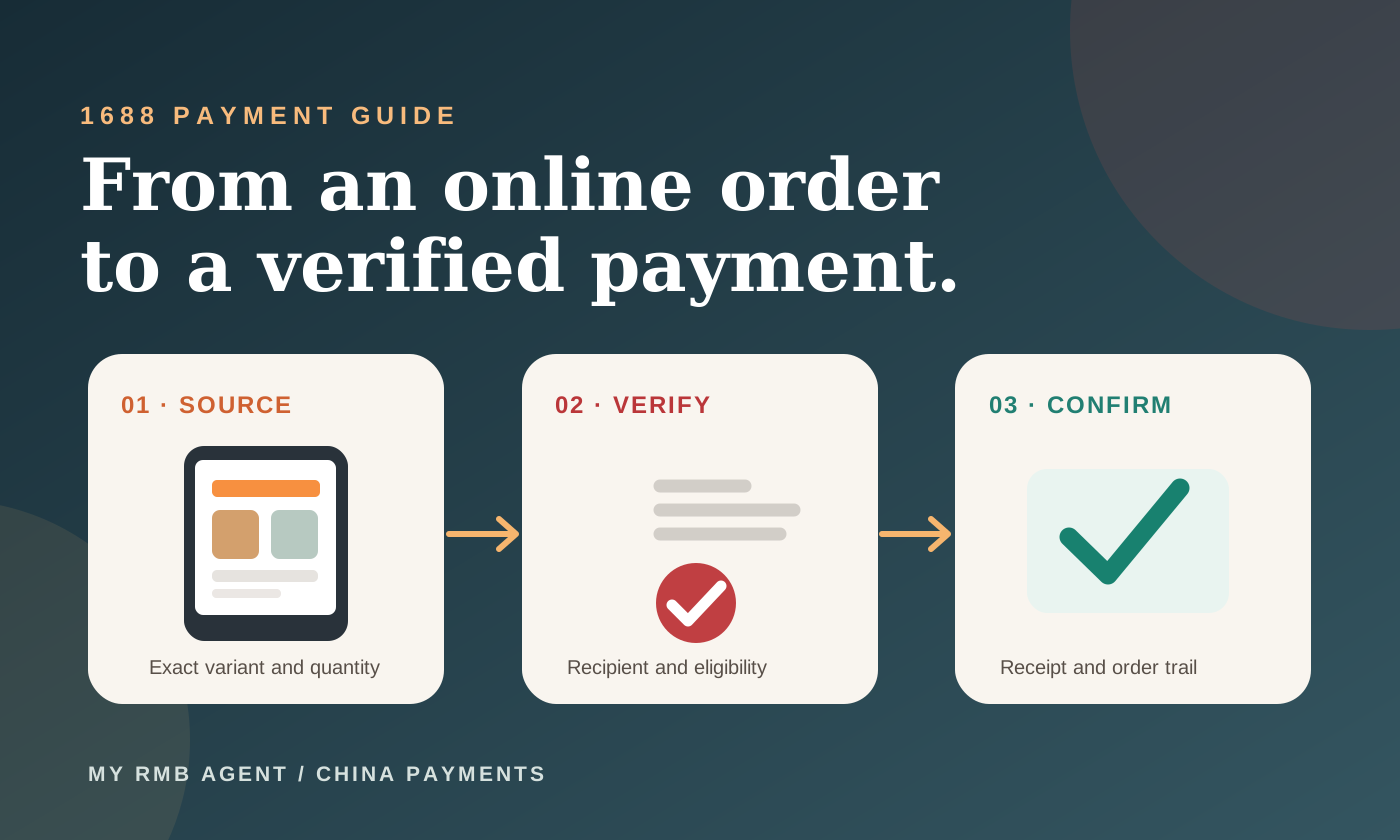
The essential takeaway
Buy Chinese Yuan with Naira, fund Alipay or WeChat Pay, and pay your Chinese supplier. Follow the complete process from sign-up to your downloadable RMB payment receipt.
Buying RMB from Nigeria: what this guide covers
You have agreed a price with a supplier in China, but the invoice is in yuan and your money is in Naira. Or you need to fund an Alipay or WeChat account and want a clear record of the transaction. MY RMB AGENT gives you a way to place a supported RMB order online, see the Naira amount to pay and follow the order through to its receipt.
RMB is short for renminbi, the Chinese currency; yuan is its main unit. In this guide, RMB, Chinese Yuan and the ¥ symbol refer to the amount you want the recipient to receive. The website calculates the corresponding Naira amount when you enter your order details.
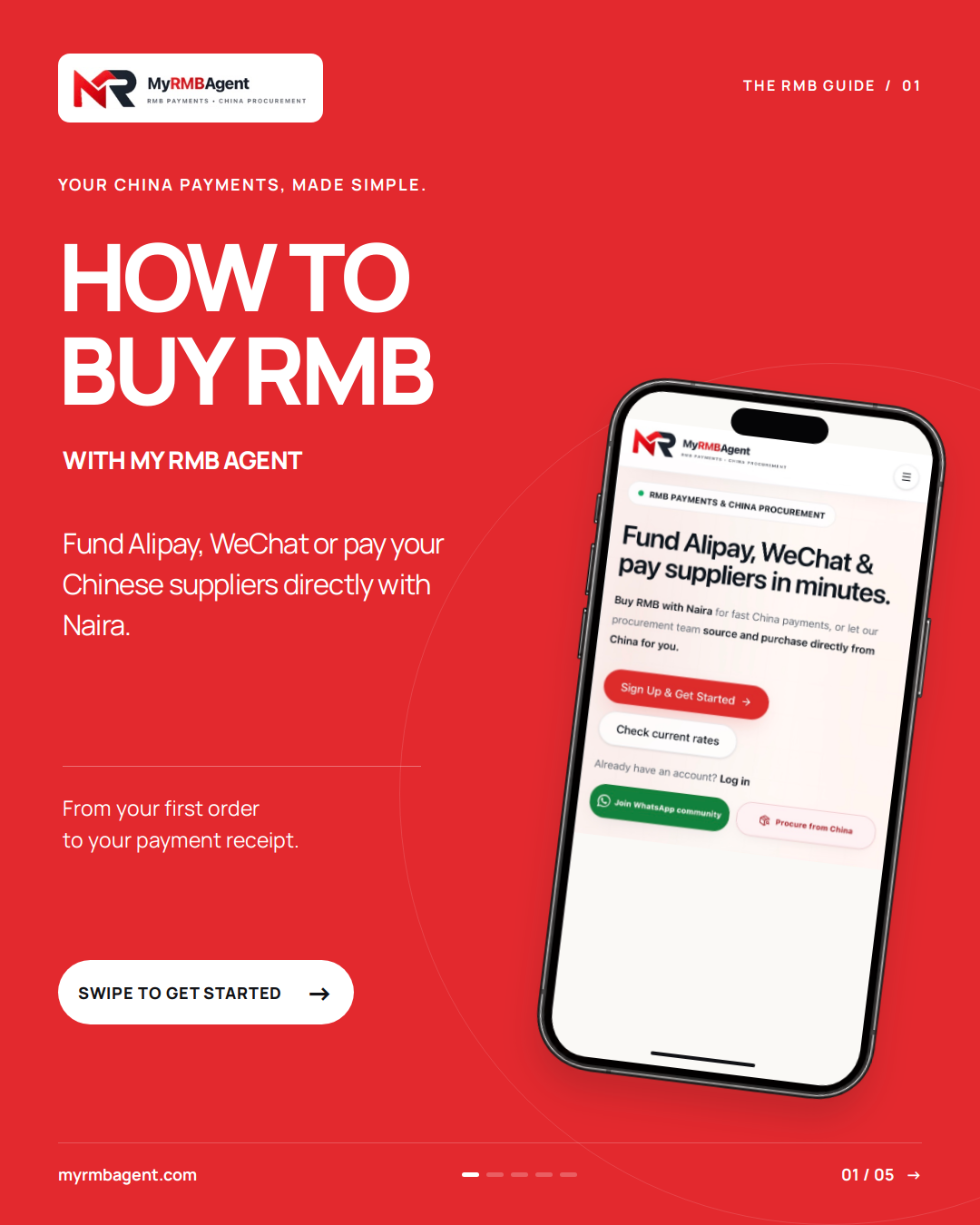
Below, we walk through the real customer journey shown in our illustrated guide. The process is: create an account, select Buy RMB, enter the amount, provide recipient details, review the order, transfer Naira, wait for payment verification and RMB processing, then download the receipt after funding is completed.
Before you start: keep these details ready
Have the exact RMB amount, the intended recipient's correct payment information and access to your Nigerian bank account ready. If you are paying a supplier, confirm the amount against the agreed invoice or order before you begin. Ask whether they want to receive through Alipay or WeChat Pay, and obtain the appropriate QR code or account details.
For a QR-code payment, save a clear image supplied by the intended recipient. Avoid cropped, blurry or partially covered codes. Check that it belongs to the person or business you intend to pay; do not assume a code copied from an old chat is still the right instruction for a new purchase.
The screens in the graphics were captured for this tutorial. Their amounts and exchange rates are examples, and private recipient and banking information has been masked. Always use the current rate, payable amount and payment instructions displayed on your own live order.
Steps 1–2: create your account and select Buy RMB
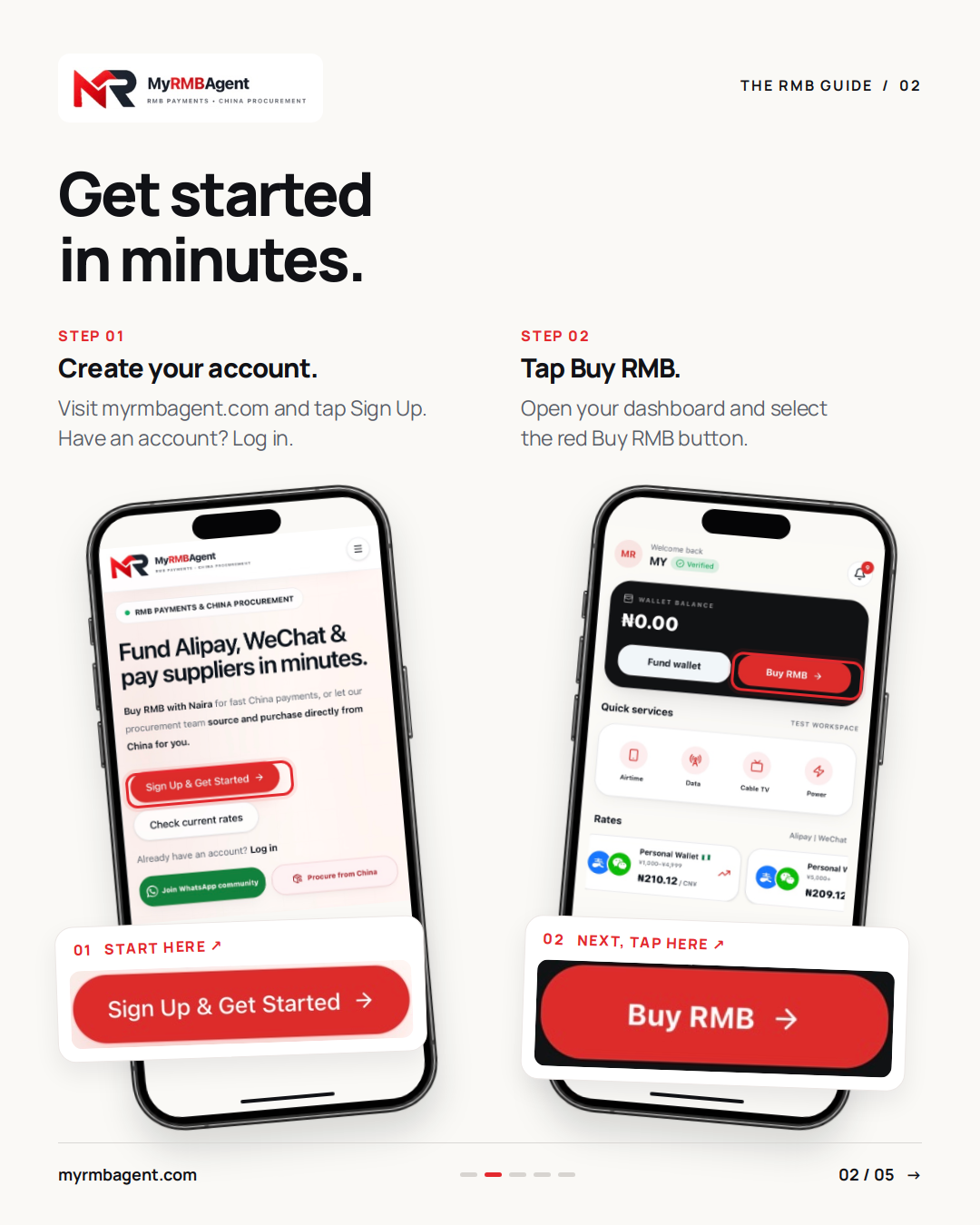
Visit myrmbagent.com and tap Sign Up & Get Started. Follow the registration steps shown on the website and complete any account checks requested. If you already have an account, select Log in and use your existing details so your new order stays connected to the same customer profile.
Once you are signed in, open your dashboard and find the red Buy RMB button. Tap it to start a purchase. This opens the RMB order flow, where you can enter your amount and specify who should receive the payment.
Buying RMB and adding money to a wallet are different actions in the dashboard. For the purchase process described here, choose Buy RMB. If you are unsure which service fits your transaction, ask support before sending money.
Step 3: enter the amount of RMB you need
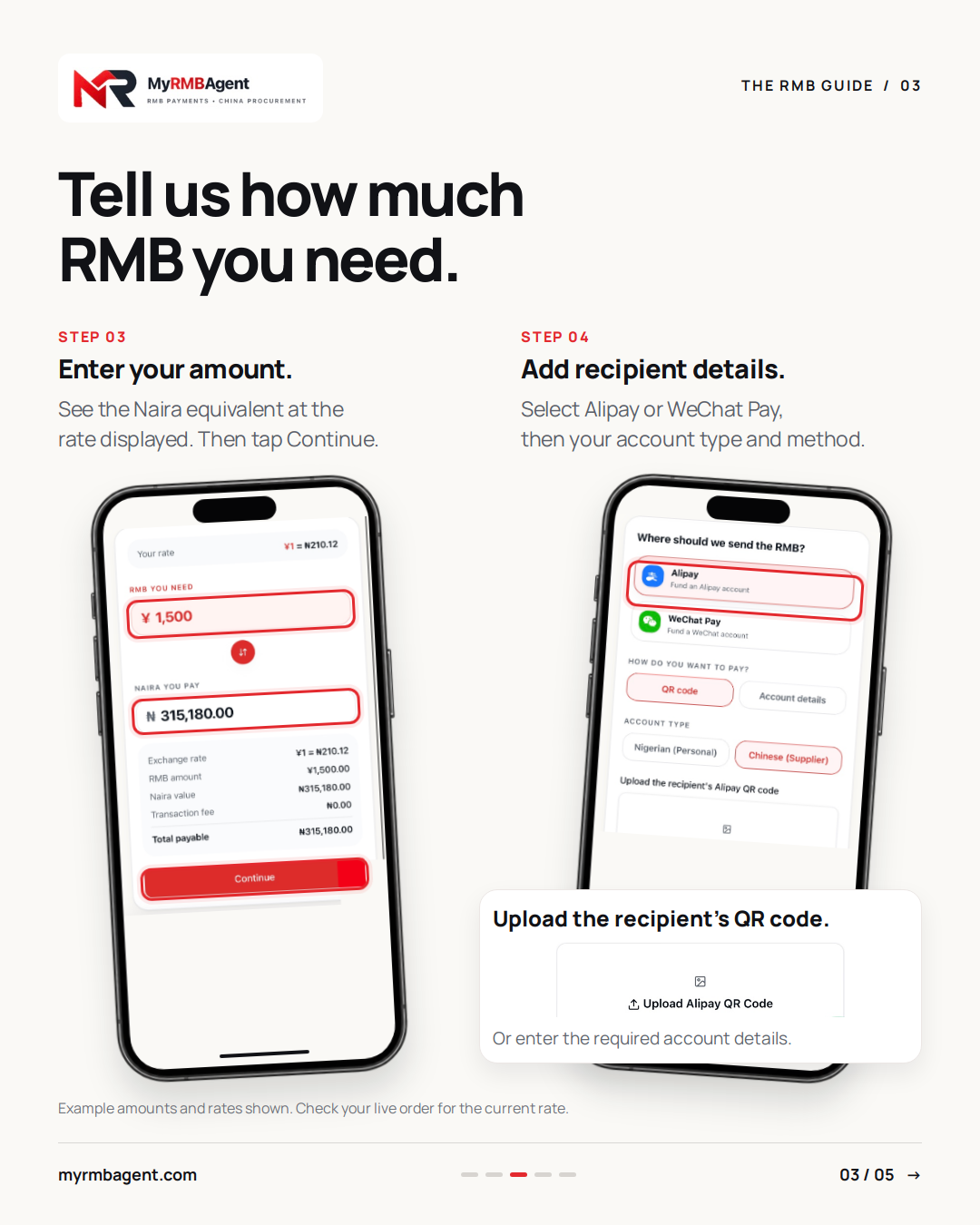
In the field labelled RMB YOU NEED, enter the amount in yuan. For example, if the agreed supplier payment is ¥1,500, enter 1,500 as the RMB amount. Do not enter your Naira budget into the RMB field: the two amounts represent different currencies.
The calculator shows the Naira equivalent using the rate displayed for the order. Read the breakdown, including any fee shown and the total payable, before continuing. The amount on an older screenshot or a previous order should not be used to fund a new transaction.
For context, the example in our graphics shows ¥1,500 at ₦210.12 per RMB, giving a Naira total of ₦315,180 with a ₦0 transaction fee displayed for that example. This is a historical illustration, not today's quotation or a promise that every order has no fee. Your own order page is the reference for what you need to pay. When the amount is correct, tap Continue.
Step 4: choose Alipay or WeChat and add recipient details
The next screen asks where the RMB should be sent. Select Alipay or WeChat Pay to match the destination requested by your recipient. Check the account type as well: the illustrated flow offers Nigerian (Personal) and Chinese (Supplier). Choose the option that accurately describes the recipient rather than copying whichever one is selected in the example.
Next, choose the available payment method. If you select QR code, upload the recipient's Alipay or WeChat QR image. If you select Account details, provide the information requested by that form. The exact details needed depend on the destination and method, so follow the fields on your screen.
Review the uploaded image and any name or account information before moving on. If the recipient sends a corrected code, replace the old upload instead of proceeding with a known error. When the recipient details are ready, tap Review order.
Step 5: review the order before proceeding to payment
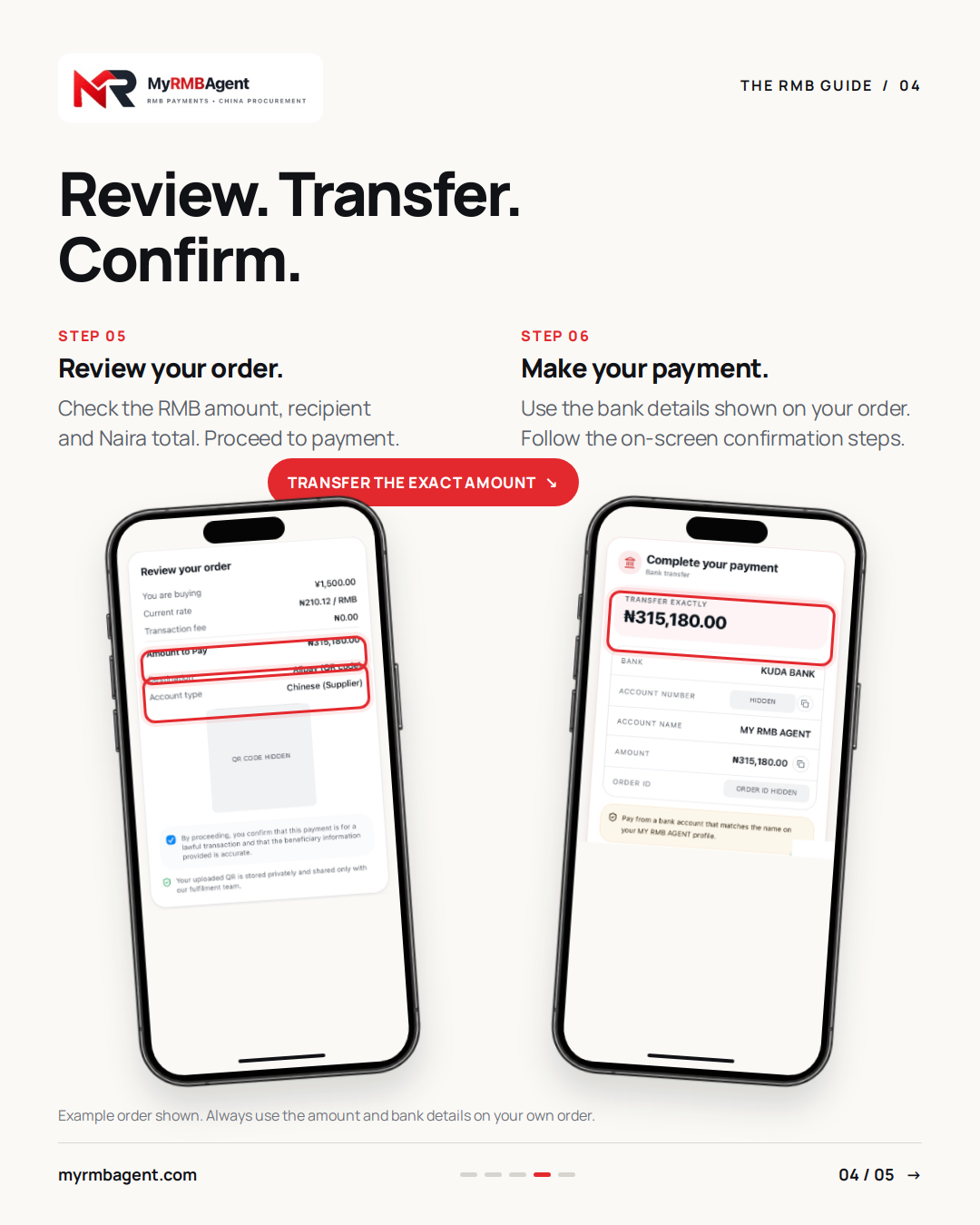
The review screen brings the important details together. Check the RMB amount, displayed exchange rate, fee if any, total Naira payable, destination and account type. For a QR payment, make sure the uploaded image is the one you intended to use.
Take a moment to compare the recipient information with your supplier's instructions. A correct RMB amount sent to the wrong destination does not complete the purchase you intended. If anything is wrong, use Back to correct it before proceeding to payment.
Read the confirmation on the review page and proceed only when the information is accurate. Your order is then prepared for payment. Creating an order records your request; it does not by itself confirm that Naira has been received or that RMB has been sent.
Step 6: transfer the exact Naira amount shown
Open the bank-transfer instructions on your order page and use the bank, account name and account number displayed there. Transfer the exact Naira amount requested. Do not reuse the masked details in this article, a bank number from a graphic or the amount from a different customer's order.
The illustrated order instructs customers to pay from a bank account that matches the name on their MY RMB AGENT profile. Follow the corresponding instruction on your own order. Keeping the amount, payer details and order reference consistent helps the payment be identified correctly.
After making the transfer, follow the confirmation steps actually shown on the website. If your screen asks you to tap I've transferred, do so after sending the money. Where a receipt-upload option is provided, follow the instructions there. An uploaded receipt or a confirmation tap is supporting information; payment still needs to be received and verified.
Keep your bank transfer receipt and your MY RMB AGENT order ID. If your bank reports a pending transfer, or you notice a mistake after paying, contact support with those details so the transaction can be checked. Avoid making a second payment simply because the first one has not yet appeared on the order.
Step 7: understand Payment confirmed and RMB processing
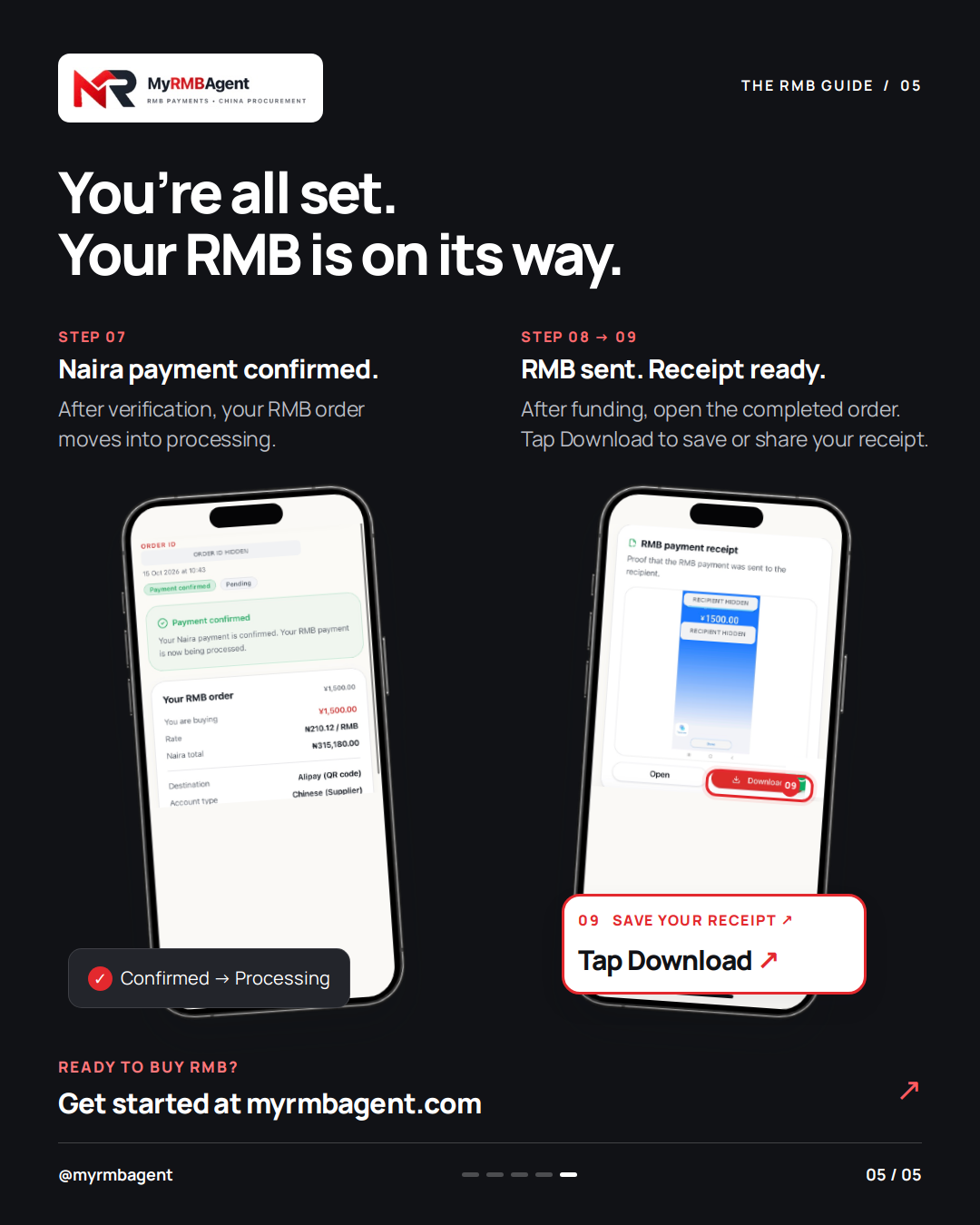
Once your Naira transfer has been received and verified, the order can show Payment confirmed. In the example, the status message reads: Your Naira payment is confirmed. Your RMB payment is now being processed. That distinction matters: Naira confirmation and RMB funding completion are separate stages.
An order can therefore show a confirmed Naira payment while its RMB fulfilment is still pending or processing. Continue checking the order details in your account for progress. Do not tell your supplier that funding is completed solely because the Naira payment has been confirmed.
If you need an update, use the support route on the website and include your order ID. Confirmation and fulfilment depend on the actual transaction being checked and processed; this guide does not set a guaranteed completion time.
Steps 8–9: check RMB completion and download the receipt
After the recipient has been funded and the payment proof is made available, open the completed order on your dashboard. Look for the RMB payment receipt section. This is the proof associated with the RMB payment to the recipient, rather than the Naira transfer receipt from your Nigerian bank.
Use Open to view the available proof and Download to save a copy. You can share that RMB receipt with your Chinese supplier so they can reconcile it against their own incoming payment and order records. Keep both receipts and the order ID together for future reference.
A supplier payment receipt documents the payment stage. It does not establish that goods have been manufactured, dispatched, inspected or delivered to Nigeria. Continue confirming those arrangements separately with your supplier or procurement provider.
A simple way to read your order status
Order submitted or Awaiting payment means the purchase request has been created and is waiting for its payment stage to be completed. Naira Payment confirmed means the incoming Naira has been verified. Pending or Processing on the fulfilment side means the RMB payment is still being handled.
RMB payment completed means the funding stage has been completed, while Receipt available means you can view or save the attached RMB payment proof. Read the full status message and receipt section together, because payment confirmation and fulfilment can be displayed separately.
If something does not match what you expect—for example, your bank shows a successful debit but the order is still awaiting payment—send support your order ID and transfer reference. A bank debit alone does not explain whether the recipient account has received and reconciled the funds.
Common questions before your first RMB purchase
Can I pay my supplier without funding my own Alipay first? The illustrated flow lets you provide a supported recipient's Alipay or WeChat details directly. Select the correct supplier account type and destination, and confirm the recipient information before paying. For a different route or a larger transaction, ask support which options are currently supported.
What if I only have an account number instead of a QR code? Select Account details if that option is available for your chosen destination, then complete the required fields. Do not upload an unrelated picture just to pass the QR-upload step.
Can I change the QR code after paying? Contact support promptly with the order ID if you discover a mistake. Whether a change can be made depends on the order's actual processing state; do not assume recipient information can be replaced after the RMB has already been sent.
Will the rate or minimum purchase be the same as in the graphics? Use the conditions displayed on the live form. The tutorial screenshots explain the interface and do not establish a standing exchange rate, purchase minimum or fee schedule.
What if the receipt is not visible yet? Check whether the order is still processing and whether an RMB payment proof has been attached. Ask support for clarification using the order ID. Do not treat the absence of a download as a reason to place and fund the same purchase again.
Ready to place your RMB order?
Start at myrmbagent.com, create an account or log in, and choose Buy RMB on your dashboard. Keep the exact RMB amount and verified recipient details ready, read the Naira total and use the payment instructions on your own order.
The five graphics in this guide are a visual companion you can return to at each stage. If you also need help sourcing the goods, rather than only paying a recipient, explore the separate China procurement service. For a supported RMB purchase, begin with Buy RMB and follow the order through to its completion and receipt.
Practical next step
Ready to buy RMB?
Sign up or log in, tap Buy RMB and follow your live order from its Naira quotation to the completed RMB payment receipt. Have your recipient details ready before you begin.
Sources & further reading
This walkthrough is based on the MY RMB AGENT customer screens illustrated above. Use these links for account access, current order information and related service guidance.